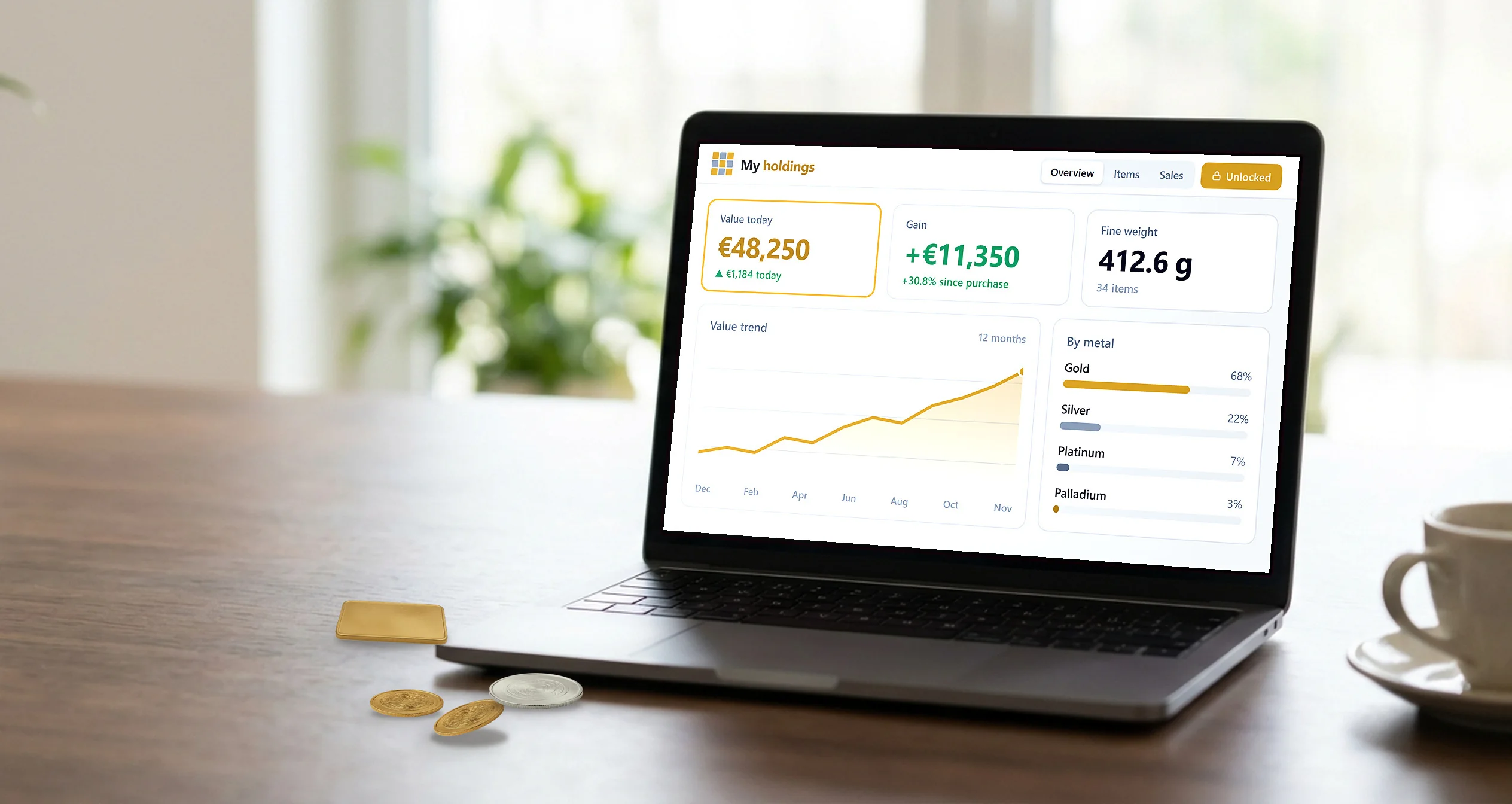
Precious metals manager. All under your control.
Manage precious metals, see their value at the live price, gain per item and the holding period under § 23 EStG.
Calculated in your browser, saved as an encrypted file on your device — no account and no email address.
Rather take a look first?
100% free, hand on heart. No paywall, no subscription, free for good.
- 100 % anonymous
- No account
- No outside access to your data
Like what you see and read?
We pour our heart into keeping preciousmetalprices.com fast, clean and free — no paywalls, no clutter, just reliable facts and live prices. If it helps you, the nicest way to say thank you is to pass it on. Every share helps a fellow investor discover us and keeps the project alive. 💛
The difference
Precious metals manager: ‘anonymous’ is not the same as ‘with you’
Other providers of precious metals management advertise that you can sign up without an email address. That is more than most do — but it answers the wrong question. What matters is not your name but what is on your list. And with an account, that sits on someone else’s server, in someone else’s database, with an operator who can read it technically.
Standard practice
Anonymous online accounts
- Where is the list kept?
- In the provider’s database.
- Who can read it?
- The operator has technical access. You have to trust them.
- What happens in a data breach?
- Your inventory of holdings is part of the leaked data.
- What happens if the service is discontinued?
- You have to export your data beforehand.
Precious Metal Prices
No account is needed
- Where is the list kept?
- As an encrypted file in the location you choose.
- Who can read it?
- Only whoever has your key. We do not have it.
- What happens in a data breach?
- Our servers hold metal prices and an anonymous daily counter. No customer data.
- What happens if the service is discontinued?
- Your file stays readable. The file format is publicly documented.
Under the hood
Encrypted here means: verifiable
Your holdings file is secured with a key made of eight randomly chosen words. You can read these words aloud, copy them out and print them — nobody ends up writing down a password made of special characters. When opening, your device computes for a while — about one second at the recommended level; this computing time applies to every attempt, including an attacker’s.
You choose the security level yourself. The application first measures your device’s computing power and suggests the suitable one.
Method
AES-256-GCM
Key derivation
PBKDF2-HMAC-SHA256
Rounds
600.000 – 7.200.000
Key length
72 bits
Scope of features
What the precious metals manager does
Completely free, with no feature tiers and no trial period. What is listed here is available to you from the first visit.
Value at the live price
Value of holdings, gain and loss per item — continuously updated for gold, silver, platinum and palladium, plus rhodium, ruthenium, iridium and copper. Display in euros, dollars, francs or pounds, in grams, ounces or kilograms, as you prefer.
Holding period per lot
To the day under § 23 EStG, including the exemption limit of 1,000 euros — with the date from which a sale is tax-free.
Was it worth it?
Compares your cost with today’s value — and with the purchasing power that the same money left in an account would still have today, calculated with the consumer price index. Optionally also against an interest rate that you enter yourself.
Overview tailored to you
The start view consists of twenty-three widgets that you choose, name, set the width of and rearrange yourself. You sort the tables in them with a click on the column header. Four templates change everything in one go — from figures and tables to rings, bars and curves.
Multiple holdings
As many as you like, each with its own name and its own key. Whoever opens one does not see the others — for a separately managed securities account, say.
Back up encrypted
If you wish, the application saves continuously to a file of your choice — without opening a dialog each time (in Chrome and Edge). Output as CSV, Excel or PDF.
All features at a glance
Entering holdings
- You import your existing list as a CSV or Excel file by dragging it onto the page or choosing it through the file dialog.
- The application detects the delimiter, decimal notation and date format by itself. You do not have to adjust your file beforehand.
- Columns that go beyond the provided fields you adopt as custom fields and give them a label.
- If your table lacks details required for the calculation — such as the metal or the fineness — you add them afterwards. If several items are affected, the value can be set for all of them in one step.
- Products that the catalogue does not contain you enter yourself, with your own fine weight and metal.
- You create individual items directly in the application if you do not want to import a list.
- If you import the same list a second time, the application recognises the items already present and, if you wish, takes over only the new ones.
- If you bought in francs, dollars or pounds, the amount is converted at the exchange rate of the respective purchase day, not today’s. The stored rate series go back to 1999.
Analysing holdings
- For each item you see the cost, the current value and the difference as gain or loss.
- You switch the display to euros, dollars, francs or pounds and choose between grams, ounces and kilograms.
- A summary shows fine weight and purchase price separately by metal.
- A comparison sets against your cost what the same amount in a non-interest-bearing account could still buy today. The basis is the consumer price index; you can enter an interest rate for comparison yourself if you wish.
- A curve plots the value of holdings month by month against the accumulated cost. It begins with your first purchase, not earlier.
- For any reference date you choose, you can look up what the holdings were worth then. The monthly prices go back to 1999.
- Further analyses show when and where you bought, which countries of mintage your pieces come from, how the holdings are spread across denominations and which item becomes tax-free next.
Tax and sales
- The one-year holding period under § 23 EStG is calculated to the day for each lot.
- For each item, the date from which a sale can be made tax-free is shown.
- The exemption limit of 1,000 euros is taken into account. If it is exceeded, the entire gain is taxable and not just the excess.
- You put a sale together yourself or have one suggested — including part of an item, say five of ten coins — and see the tax result before you carry it out.
- Recorded sales leave the holdings and appear in a separate list with date, proceeds and the pieces disposed of. They count towards the year’s exemption limit and can be reversed.
- When recording, you enter the proceeds according to the statement. They are allocated to the pieces disposed of by value on the sale date, by fine weight, or by you line by line.
- For each recorded sale you save a statement as a PDF — with the pieces disposed of, purchase date, holding period, cost, proceeds and gain. The file carries the sale date in its name and can be generated again at any time later.
- For insurance and estate purposes you create an inventory of your holdings with quantities, values and date of creation.
Working in the table
- You edit every value directly in the table, including your own fields.
- The table can be sorted by any column, ascending and descending — including by your own fields — and searched and filtered.
- Which columns appear in the table and in what order you set in Settings, by dragging; the others are available as further columns. The associated data is retained.
- You create custom fields at any time — as text, number, date or yes/no —, rename them or remove them again. A column of the same name from a further list ends up in the existing field.
- You also sort the tables in the overview widgets with a click on the column header. Which columns a widget shows, in what order and by what it is sorted when opened, you set for each widget.
- You page through long lists; how many rows appear on a page is your choice.
Saving and output
- You save your holdings encrypted or, if you want to process them elsewhere, in readable form.
- If you wish, you link the application permanently to a file. The holdings are then backed up by hand or at intervals of one, five or fifteen minutes, without a dialog appearing each time. Chrome and Edge can do this; Firefox and Safari do not allow it, so there you save by hand.
- You keep as many holdings as you like separate from one another, each with its own label and its own key.
- You print the key when creating the holdings and again at any time from Settings. The printout contains the key, the date, the name of your file, the address for opening and the method — no items and no amounts.
- Output is as CSV, Excel or PDF. Your own fields are included in all three.
- The saved holdings file reproduces your holdings without loss and can be read in again at any time — encrypted or open.
- You can put any output in a ZIP archive protected with AES-256 if you wish.
Use and setup
- Light and dark mode are fully available. The workspace follows the portal’s brightness and sets itself apart from it with its own background.
- The application has four views: the Overview made up of your widgets, the Items list, Plan a sale, and Prices with the trend per metal. Output is at the right-hand end of the bar, and the gear beside it opens Settings — as a view of its own, not a window over your work.
- You rearrange the widgets in the overview with the mouse or with two arrows. For each widget you can set the heading, the width in five steps and — where lists are concerned — the number of rows. The width applies from laptop size; on a phone each widget spans the full width.
- On a phone the item list becomes cards, editing an item opens full screen, and the views sit behind a menu button. You move a widget’s columns and tiles there with your finger. If a table is wider than the screen, a scroll bar at its edge shows that it continues.
- The application can be installed as an app — with its own icon and its own window, starting directly in your holdings. Chrome and Edge offer this by themselves; on the iPhone it goes through ‘Share’ and ‘Add to Home Screen’.
- With ‘Holdings’ in the header you create or open holdings from any page of the portal. In the application it becomes ‘Lock holdings’ — saving happens first.
- The application’s feedback gathers behind a bell, rather than interrupting your work with notification windows.
- On first use an assistant guides you through setup in seven steps. It checks nine technical prerequisites of your device and recommends the suitable security level.
- You decide whether the holdings are stored encrypted on the device or exist solely in your file.
The dashboard
Precious metals manager dashboard: you decide what you see
Most holdings managers show everyone the same thing. Here the start page of your holdings is a surface made of twenty-three widgets, which you put together yourself. Whoever needs only the value and the holding periods takes two. Whoever wants to see their holdings from every side takes all of them.
Choose
You add each widget or throw it away again. Whatever has no data does not appear at all — an empty box tells you nothing.
Arrange
Rearranging is done with the mouse or with two arrows. You choose the width in five steps, from a quarter to the whole row.
Label
Each widget carries your own heading if you wish. For the lists you decide how many rows are visible, which columns, and what they are sorted by — you can re-sort at any time with a click on the column header.
Templates
Four templates change everything in one go: the default, ‘Charts’, ‘Figures and tables’ — and once, everything there is, to look at.
The twenty-three widgets at a glance — the preview shows the form of the display; the figures in it are yours.
Key figures
Value, purchase price, gain and holding periods.
Quantity by metal
One card per metal with quantity, value and price.
Breakdown by metal
A ring showing the share of today’s value.
Cost and value today
Paid versus today, per metal.
Where your money went
The cost per metal — not today’s value.
Fine weight and purchase price by metal
What you own and what the ounce cost you.
Value trend
Value of holdings month by month, against cost.
What you have invested
Your purchases added up, by purchase date.
Best items
Highest rise in value — purchase price against today.
Weakest items
Smallest rise in value, or loss.
Most valuable items
The biggest items by today’s value.
Recently bought
The most recent additions to your holdings.
Latest sales
Recorded sales with date and proceeds.
Denominations
Sizes, troy ounces and the premium paid.
Where you bought
Purchase price by dealer.
When you bought
Additions per month, year or in total.
Holdings in numbers
Holding time, oldest and most expensive item.
Next period expiry
Which item becomes tax-free next.
Was it worth it?
Paid in, today, and the same money in an account.
Holdings in retrospect
What your holdings were worth on a reference date.
Purchases per year
Purchase totals per year as bars.
Comparison with the coin catalogue
Weight and dimensions from your list against the catalogue.
Where your pieces come from
Breakdown by country of mintage.
Your arrangement is kept and travels with your holdings file: open the file on another device and the dashboard is there just as you set it up. On a phone each widget spans the full width — the width setting applies from laptop size.
Sample holdings, no account, no setup — and nothing is saved.
Taking over existing lists
Your columns survive the import
A holdings list kept up over years represents work. Software usually takes over only the fields its own schema provides — everything else is lost. Here every column is kept. You name it, and it becomes part of your holdings: in the table, when saving and in every export.
Mapping columns
| Your column | is imported as |
|---|---|
| Description | Product |
| Quantity | Quantity |
| Purchase price (CHF) | Cost · price on purchase day |
| Insured value | custom field — kept |
| Condition | custom field — kept |
| Year | custom field — kept |
No foreign schema
Your data is not forced into a prescribed format. Our format takes in yours.
Included in exports too
Your fields appear in CSV, Excel and PDF — and are recognised automatically on the next import of columns with the same name.
Extendable at any time
You create further fields at any time — as text, number, date or yes/no —, rename them or remove them again.
Price
What does the precious metals manager cost?
Nothing.
No fee, no subscription, no paid tier and no trial period that eventually runs out. What you see here is the full scope of features — from the first visit and for good.
Why we can do this
Because the manager runs in your browser, we incur no ongoing cost per user: no account, no database, no storage space for your holdings. What costs us structurally nothing need cost you nothing.
Why we offer it
Anyone who invests money in physical precious metals should not have to pay extra to keep an overview of it. An inventory of holdings is not an additional product but part of handling your own wealth properly.
And your data?
Free offerings are often financed through their users’ data. Here that is ruled out: we could not analyse or pass on your holdings data, because it never reaches us. That is not a promise but a property of how it is built.
You have our word on it
The precious metals manager stays free. There will be no paywall that retroactively locks existing features, and no limit that makes existing holdings unusable. If we should one day be unable to continue this offering, your files remain readable — the file format is publicly documented and not tied to any account.
Objections
What we hear most often
We meet four objections regularly when investors do not want to hand over the management of their precious metals. Below is the answer to each one.
Objection
‘Everyone says that. How do I know nothing is really uploaded?’
Objection
‘Everyone says that. How do I know nothing is really uploaded?’
You do not have to believe it. You can check it: press F12, open the "Network" tab and carry on as usual. What you will see is the recurring request for the metal prices, which are the same for every visitor — and, whenever you create, open or save a holding, a short signal to /api/bestand-zaehler.
With that signal, open the "Payload" tab. It contains a single word: erstellt, geoeffnet or gespeichert. No figure, no name, no identifier, no timestamp — nothing from which a device or a person could be derived. At our end it increases a daily counter. We store no event: at the end of the day the database holds one line of the form "gespeichert · 16.11.2026 · 42" — and not 42 lines that could be put in order.
Why at all? Because otherwise we do not know whether this tool is used — and that decides whether we keep putting time into maintaining and extending it. That is the whole purpose, and for it we need no more than these three numbers per day. Not one line of your holdings leaves the device. The counter changes nothing about that — and that is the sentence by which you should judge us.
It is secured not by a promise but by a technical block: a Content Security Policy allows data connections only to our own server. If we were to include another provider’s analytics script by mistake, it could send nothing outside — the browser blocks the connection.
Objection
‘Other precious metals managers are anonymous too. Where is the difference?’
Objection
‘Other precious metals managers are anonymous too. Where is the difference?’
‘Anonymous’ answers the wrong question. What deserves protection is not your name but what is on your list: size of holdings, products, purchase dates and storage locations. With an account, exactly this information sits on someone else’s server. Anonymous merely means that no name is next to it.
Three concrete risks follow: a data breach at the provider also affects your holdings. You have to request deletion from the operator. And if the service is discontinued, you have to export in good time. None of these risks exists when the data never leaves the device.
Objection
‘I have kept my list in Excel for years. I do not want to retype it.’
Objection
‘I have kept my list in Excel for years. I do not want to retype it.’
That is not necessary, and you do not have to adjust your table either. Drag the file into the application; delimiter, decimal separator and date format are detected automatically — for CSV as for .xlsx. What matters here: Your own columns are kept in full.
Anyone who keeps their holdings over the years has created their own columns: insured value, condition, year. Applications that know only their own fields discard these details on import. Here you name each unknown column, and it remains part of your holdings — in the table, when saving and in every export. Your data is not forced into our format; our format takes in yours.
If your prices are in francs, dollars or pounds, the calculation uses the rate of the purchase day , not today’s — the rate series go back to 1999.
Objection
‘A file on my computer is surely less secure than a server run by specialists.’
Objection
‘A file on my computer is surely less secure than a server run by specialists.’
The opposite is true. A server with thousands of holdings is a rewarding target for attackers; a single encrypted file on a private device is not. On top of that, your file is secured with AES-256-GCM — the same method that is also used for hard-disk encryption. Without your key the content cannot be read.
The key consists of eight randomly chosen words — no birth date, no guessable password. Before every attempt to open it there is also a computing task that noticeably occupies even your own device — about one second at the recommended level. An attacker would have to spend this computing time on every single combination. The technical figures are in the section ‘Under the hood’.
Protection against data loss: print the key. The application offers this when you create holdings, at any time from Settings, and for every file to which you give a key of its own. The printout contains the key, the date, the name of the file and the address for opening — no items and no amounts. Keep it with your insurance documents and back up the file in a second place. Paper in a folder outlasts any hard drive.
Frequently asked questions
Questions about the precious metals manager
Answers on use, security, exchanging your data, and on value and tax.
Use
‘Holdings’ at top right — what does it show, what can I do with it?⌄
It is your access to the holdings, and it sits on every page of the portal — so you do not have to find your way back here first. The menu offers two routes: ‘Create holdings’ starts the setup, ‘Open holdings’ leads to your holdings. If an encrypted copy is on this device, you then enter only your key; if there is none, you first choose your file. In the application itself the button becomes ‘Lock holdings’ — it saves first.
The padlock in the button shows the state: open while you work in your figures; closed when everything is stored encrypted — then nobody sees anything, not even whoever sits down at your computer.
Meant for shared devices: The button looks the same for all visitors, including those without holdings. Quantities or amounts are never in it. Only whoever opens the menu can tell whether holdings are here — ‘Open holdings’ is then highlighted.
Can I rearrange the overview if I do not like it?⌄
Completely. The start view is not a fixed form but a surface of twenty-three widgets: key figures, distribution rings, value curves, top lists, dealers, countries of mintage, denominations, deadlines. You add what you need and throw away what you do not look at. Each widget gets, on request, a heading of its own, a width from a quarter to the full row and — for lists — the number of rows you want to see.
Rearranging is done with the mouse or with two arrows; you sort the tables in a widget with a click on the column header. Anyone who does not want to build one by one takes one of the four Templates: the default, ‘Charts’ for rings, bars and curves, ‘Figures and tables’ for the sober version — and once everything, to see what there is at all. Your arrangement is kept and travels with your holdings file.
Does the precious metals manager also run on a phone?⌄
Yes. On a phone each widget spans the full width, the item list becomes cards, and editing an item opens full screen. The views sit behind a menu button so that the bar at the top takes little space.
You can also install the application as an app: own icon, own window, start directly in your holdings. Chrome and Edge offer this by themselves; on the iPhone it goes through ‘Share’ and ‘Add to Home Screen’. This changes nothing about how it is built — even as an app your holdings are on your device and in your file, not with us.
Do I get a statement for a sale?⌄
Yes, as a PDF. You put the sale together, enter the proceeds from the statement when recording, and save the statement straight away. For each row it gives the pieces disposed of with purchase date, holding period, cost, proceeds and gain, followed by the totals and the gain from pieces within the holding period.
The file carries the sale date in its name. Under ‘Sales’ you generate it again at any time — even years later, as long as the sale is in your holdings.
Does the manager check whether my coins are genuine?⌄
It compares what your list brings with it. If it contains weighed weights or measured dimensions, the ‘Comparison with the coin catalogue’ widget compares them with the nominal values and moves anything conspicuous to the top. It is not an authenticity check: weight and dimensions rule out crude forgeries, but not all of them.
For a single piece there is a calculator of its own on this portal: the coin authenticity checker. It deals with one piece that you are holding in your hand: weight, diameter and thickness are calculated against the nominal dimensions of 129 bullion coins, with the sound test and magnet test and the density as the reasoning behind it. That is a different job from keeping books on holdings — it needs different questions and a result for a single piece, not a row in a list.
What is the bell, and why no notification windows?⌄
Can I keep several holdings separate?⌄
Is it saved automatically?⌄
Do I have to choose between browser storage and a file?⌄
Yes, once during setup — and you can change it later. Either the holdings are stored encrypted on the device, in which case they are there straight away on your next visit. Or they live only as long as the tab is open and afterwards exist solely in your file. The second is stricter and less convenient; anyone sharing a device is better served by it.
With browser storage, a short list of your holdings with timestamp stays saved — with names only if you want that — so that the selection before unlocking has something to show. With ‘file only’ nothing is left behind, not even an entry in this list. Quantities and amounts are not in it — until November 2026 the number of items was in it in plain text; that has been removed.
Security
How do I remember the key — and what if I lose it?⌄
Not by heart — it is not meant for that. The tool suggests eight English words that can be read aloud, copied out and given over the phone without anyone having to ask about spelling. That is exactly why they are words and not a string of special characters.
Print it. The tool offers this when you create holdings, at any time from Settings, and for every file that you give a key of its own when saving. The printout contains the key, the date, the name of the file, the address for opening and the method — no items, no amounts. Put it where you keep other important things: with your insurance documents, in the safe, in the bank deposit box. Paper in a folder outlasts any hard drive.
And if you lose it after all: then the file is gone. There is no recovery, no back door and no one who could help — not even us. That is not a flaw but exactly the property for which you encrypted.
Which encryption exactly?⌄
AES-256-GCM, computed in your browser’s Web Crypto interface — not in home-written code. The key is derived from your eight words using PBKDF2-HMAC-SHA256 key derivation. The eight words come from a list of 512 and are drawn from your operating system’s source of randomness: 72 bits.
You can choose the number of rounds — 600,000, 2,400,000 or 7,200,000. The tool first measures how fast your device computes and suggests the level at which unlocking stays tolerable. More rounds cost you a little under a second and an attacker many times that, millions of times over.
Why SHA-256 and not something ‘higher’ like SHA-384?⌄
Because it would be measurably worse — that sounds the wrong way round, but it has been calculated. Modern processors compute SHA-256 in hardware, SHA-384 and SHA-512 not. With the same number of rounds, SHA-384 takes a good three times as long on your device, but only about twice as long on an attacker’s graphics card.
So you would be slowed down more than the person you are protecting yourself against. The same waiting time put into more SHA-256 rounds hits the attacker harder. With AES the question is settled anyway: 256 bits is the highest defined level, there is nothing above it. The method is nevertheless stored as a parameter in every file — a later change therefore does not make your old files unreadable.
What does the assistant check the first time?⌄
Is this GDPR-compliant?⌄
Data import and export
Which files can I drag in?⌄
I have custom columns in my table. Are they lost?⌄
My prices are in francs or dollars. Does that work?⌄
In which formats do my holdings come out again?⌄
CSV for your own spreadsheet and your tax adviser, Excel with formatting, PDF for printing and filing. Your own columns are included everywhere.
Each of the three also in a protected ZIP — AES-256 to the WinZip standard, not the old ZipCrypto, which has been broken since the nineties.
Why does Windows Explorer not open my protected ZIP?⌄
Can I also open the saved file again without you?⌄
Where does the fine weight come from, and what if mine differs?⌄
Value and tax
Do my holdings data leave the browser? ⌄
No. The file is read in the browser, the calculation runs in the browser, and there is no account and no record with us. You can check this in the browser’s developer tools (F12 key, ‘Network’ tab): nothing leaves from your file. What is retrieved are public price files that are the same for every visitor.
Should I save the file encrypted? ⌄
Yes — that is the default. An encrypted file can go into a cloud folder, into an email or onto a shared computer without anyone being able to read it. The flip side: there is no ‘forgotten key’; without the key the data is lost for good — which is why the application offers the printout when you create holdings. You save openly only if you want to process the file with another program; then it is readable by anyone who opens it.
How is the holding period calculated? ⌄
Under § 23 Abs. 1 Satz 1 Nr. 2 EStG it is one year. It is calculated under § 108 Abs. 1 AO in conjunction with §§ 187, 188 BGB: the day of acquisition does not count, and the period ends at the end of the day that corresponds to the purchase day in the following year. A sale is therefore tax-free only on the day after. A fixed 365 days would be too short across a leap year.
Does the order date or the delivery date count? ⌄
For the period, the day of the purchase contract counts, so for an online order the order date. With delivery times of several weeks that can make the difference at the edge of the period, which is why the tool lets you state which of the two dates has been entered.
Which pieces count as sold in a partial sale? ⌄
There is no statutory order of consumption for precious metals; § 23 Abs. 1 Nr. 2 Satz 3 EStG prescribes one only for fungible foreign-currency amounts. Anyone who documents verifiably which pieces they dispose of can select them — invoices with serial numbers, separate storage and a dated inventory of holdings help. Without documentation, ‘first in, first out’ is assumed in practice.
Why does the value shown differ from a dealer’s offer? ⌄
The material value is the pure metal value at the spot price. When selling to the trade you get somewhat less; when buying you pay a premium on top. How wide the spread is depends on the piece: readily traded 1 oz gold coins are close to the material value, small denominations and silver clearly below it. This tool deliberately does not estimate the sale proceeds.
Why are some coins marked ‘collector value possible’? ⌄
With commemorative and circulation coins the collector value can be above the metal value. For these items the value shown is only the lower limit. Pure bullion coins and bars, by contrast, are traded by metal content.
Is this tax advice? ⌄
No. The tool calculates periods and amounts from the details you enter and names the legal bases. It does not assess any individual case and does not replace advice from a tax adviser.